Our Location
Room 303, No. 75, Xiangyin Road, Nanlian Community, Longgang Subdistrict, Longgang District, Shenzhen City, Guangdong Province, China
Us warehouse
16477 Slover Ave DOCK#16-24
Fontana, California, 92337
United States
Installation video For Ford F150 F250 F350 2015-2021
Installation video For Ford F150 2009-2014
Installation video For Ford Explorer 2011-2019
1、Basic information of the radio and compatible functions.
The radio uses the Android system. Supports both manual and automatic transmission vehicles, without retaining the original vehicle’s sync system function. If you need to keep the original car’s sync system, please contact the online customer service and purchase a radio compatible with the original car’s sync system. The radio supports online video playback, online music playback, Google Maps navigation, GPS positioning function, 4G sim card network communication, making phone calls, WiFi connection and hotspot creation, Bluetooth connection, carplay function and Android auto function Supports the original vehicle steering wheel control (requires learning Settings), supports 48-band DSP, supports the original vehicle SONY amplifier system and BOSE amplifier system, supports B&O amplifier system (if your original vehicle has this amplifier system, you need to purchase a dedicated one separately. Now, this playback system is a special system and you need to purchase dedicated cables separately), supports the original vehicle rear camera Supports post-modification of the rear camera, supports 360-degree panoramic camera, supports free download of apps (for specific downloads, please contact the online customer service), supports Google Browser search and download…
2、Precautions before installation.
Before installation, the user needs to turn off the car engine and do not install it while it is powered on. Otherwise, it may cause the radio fuse to burn out due to voltage issues, leading to radio damage. If the radio is damaged due to the customer installing it while it is powered on, only after-sales service assistance for repair is provided, and returns and refunds are not supported. Before installing the radio in the car, please check if it is damaged. If there is no damage or missing parts, you can install it with confidence. If there are any problems, please contact the online after-sales customer service in time. It is strictly forbidden to initiate returns and refunds without contact. The seller has the right to refuse returns and refunds. Once the radio is successfully installed in the car, returns and refunds are not supported. If it is disassembled and returned after installation, it will be regarded as man-made damage. After disassembly, the radio cannot be resold, but after-sales repair technical support will be provided. If you encounter any malfunction during the installation process and are unable to install the radio independently, you can follow the installation instructions in this article for installation. Meanwhile, if you are unable to complete the installation independently, please have a professional installation engineer do it. If some functions are still not working, you need to take pictures or record videos of the current problem to show the location and send them to our professional after-sales customer service. We will make a judgment based on the relevant materials you provide. You need to follow our guidance and operate strictly in accordance with our instructions to ensure that your problem can be solved smoothly. Online video guidance is supported when necessary. If you are a purchasing user from the United States, local technical engineers in the United States can provide phone guidance when necessary. (Appointment is required.) We will provide after-sales technical services within one year after the buyer’s purchase. You can contact us at any time.
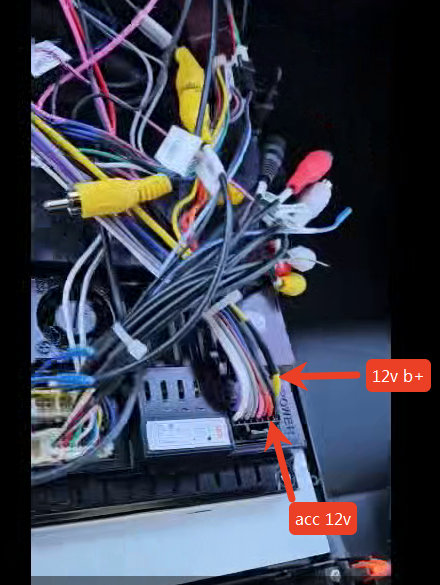
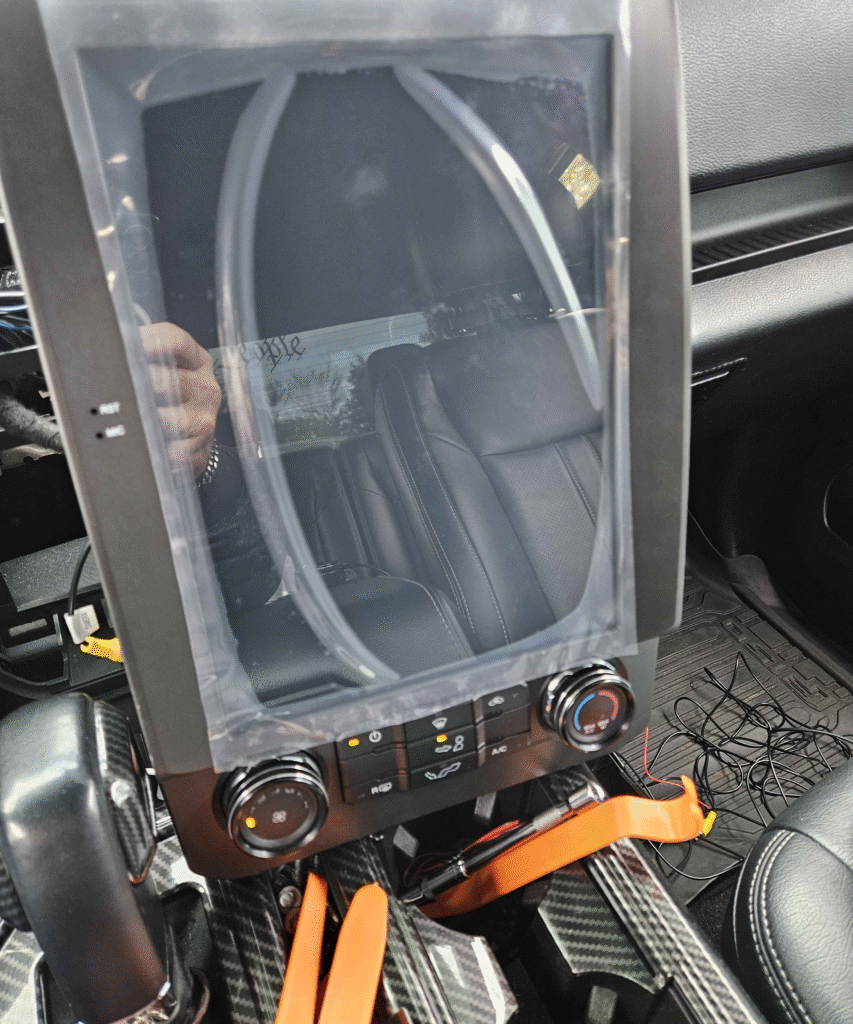
3、The radio won’t turn on. How can I solve this problem?
3.1 The first step is to check whether the radio is damaged and whether the fuse under the power cord interface of the radio installed in the car has burned out. If it burns out, please replace it to ensure normal operation.
3.2 The second step is to check one by one whether the dedicated cables that come with the Android walkie-talkie are connected correctly according to the installation video. Incorrect connection methods may also cause power failures, which may result in the radio failing to start.
3.3The third step is to check one by one whether the dedicated cables that come with the Android walkie-talkie are connected correctly according to the installation video. Incorrect connection methods may also cause power failures, which in turn prevent the radio from starting.
If none of the above is available, please check whether your original car’s power supply is powered. There are several verification methods as follows: reinstall your original car radio, start the vehicle to see if it can be powered on. If it can be powered on, then the power cord is working properly and the original car radio is turned on normally. If the original car radio is not working, please check whether the power cord of your original car is short-circuited and burned out. If the original car radio is found to be in good condition after inspection, but the Android radio cannot be turned on and enter the system when reconnected, and all the physical buttons of the original car air conditioner can be powered on and display, please check whether the fuse of the Android radio is blown. If it is blown, please replace the fuse with a new one and the Android radio will work again. It should also be noted that an Android radio requires a stable voltage of at least 12V to function. If the voltage is too low, it cannot be turned on.
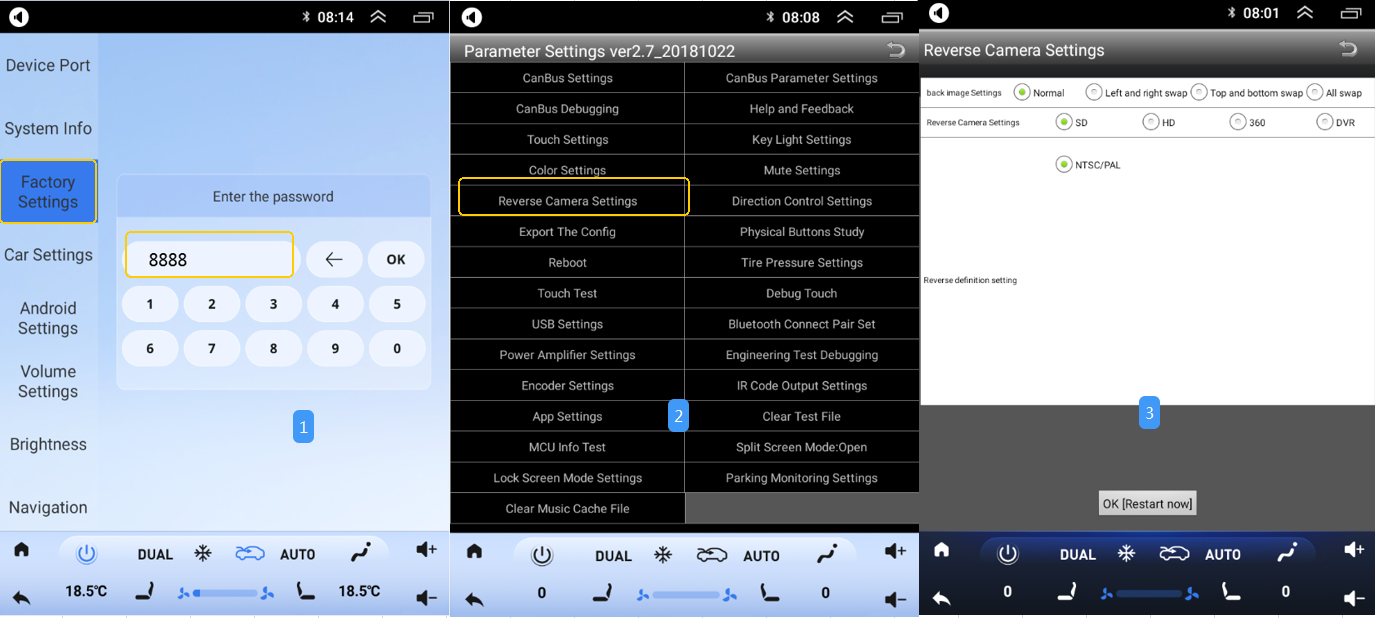
4、How to solve the problem when the radio stops working in reverse mode?
The first step is to confirm whether your camera is a built-in one in the original vehicle, a modified rear camera, or a 360-degree panoramic camera. The second step is to enter the Android radio Settings, find the camera parameter Settings. If your original car comes with it, please select the SD option. For later modifications, select the HD option. If your original car has a 360-degree panoramic camera, please select the 360 option. If your later modified 360-degree panoramic camera, please use a 360-degree panoramic camera kit with a separate host. If you wish to modify it, you can contact the online customer service separately to obtain the purchase method.
5.How to deal with the situation where the Android radio cannot play music or sound after being correctly connected?
The first step is to confirm whether the original car is equipped with a SONY audio system, a BOSE audio system, or a B&O audio system. Or the original car has no audio system at all.
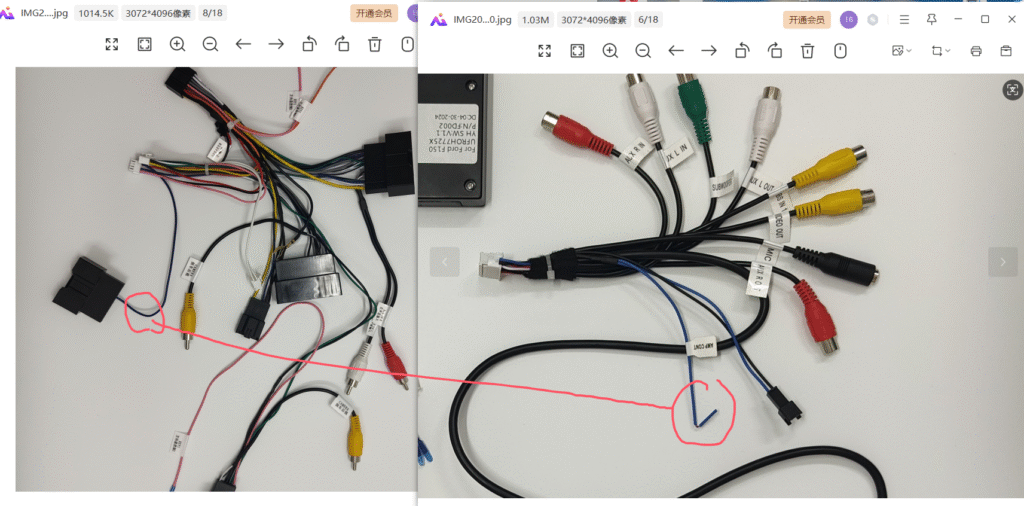
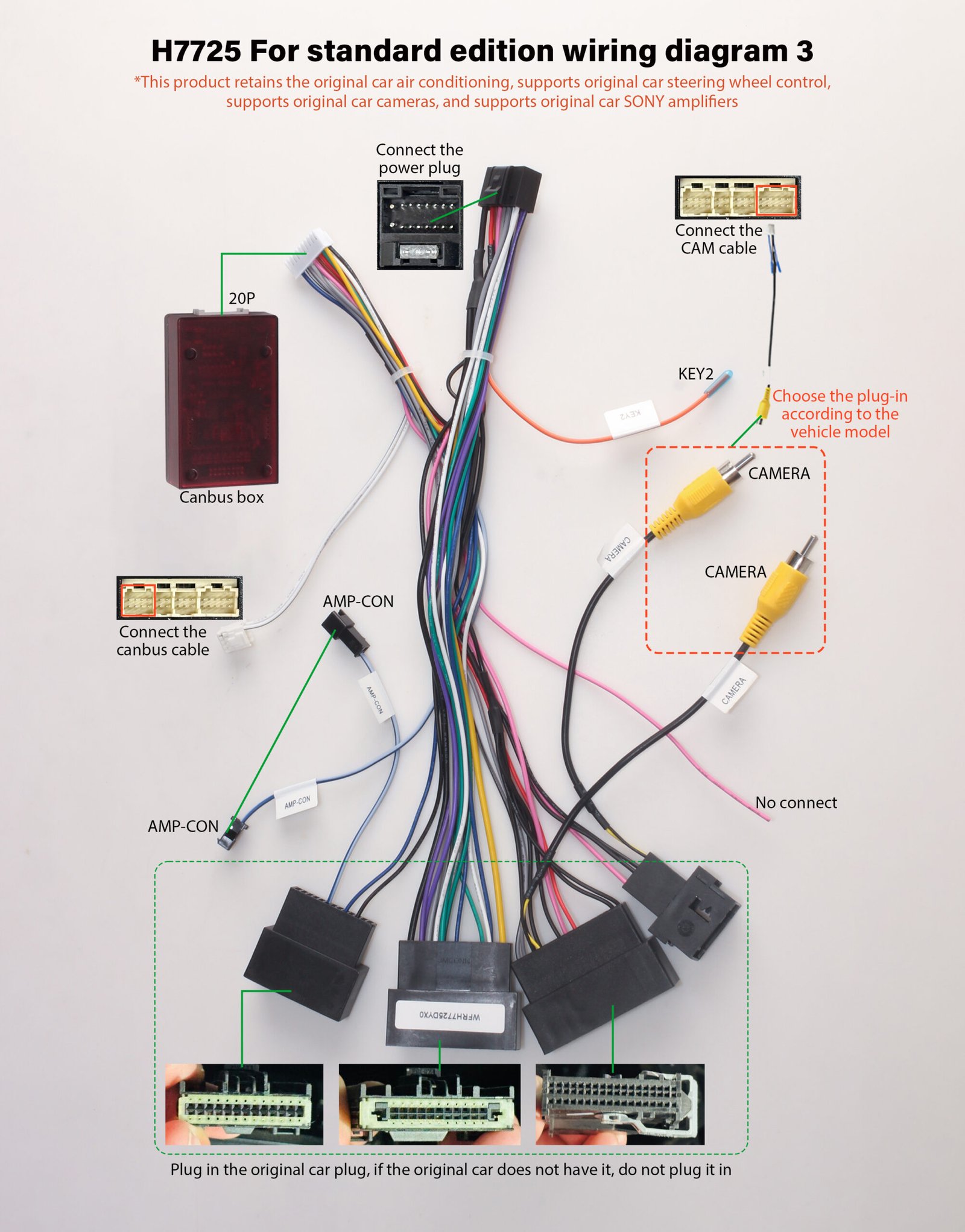
The second step is that for all SONY and bose audio systems, please connect the two cables in the picture below in parallel. They are the output and control lines of the power amplifier system. The cable may have been upgraded and optimized. If you receive a new cable, please plug the AMP-CON cable in and out with another AMP-CON cable.
The third step is that if your original car is equipped with a B&O power amplifier system, you need to contact customer service separately to purchase dedicated cables. Moreover, this model of your car is not compatible with standard cables and requires a separate cable; otherwise, the sound cannot be played. It should be particularly noted that this does not mean the radio is incompatible with your car and has nothing to do with the radio.
The third step is that if your original vehicle has no power amplifier system at all, you don’t need to perform any additional operations. Just connect the corresponding interfaces directly and it will work normally.
6.How should I deal with the situation where my radio screen shows phantom colors or a gray screen?
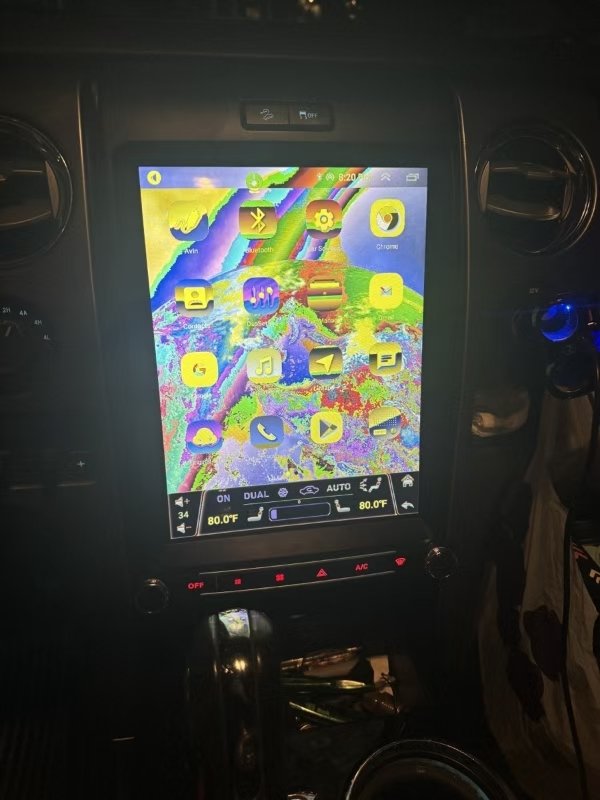
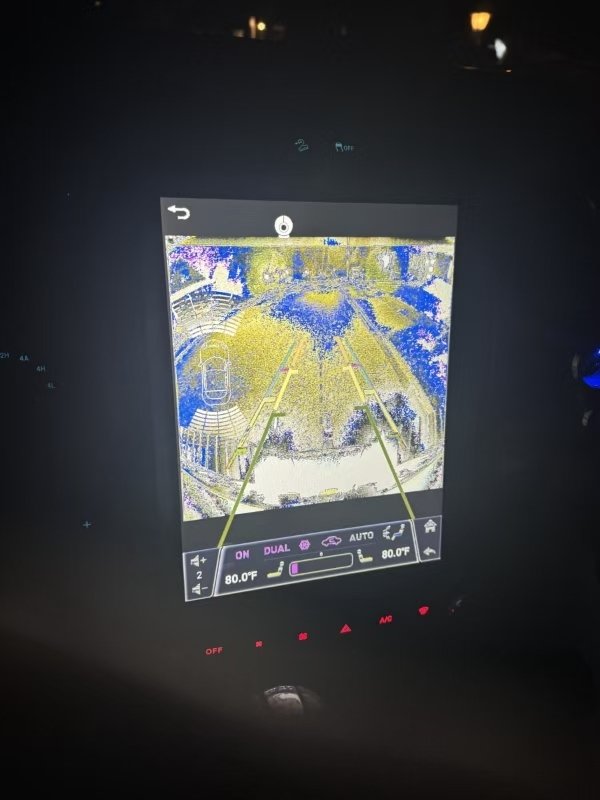
First, please confirm whether the screen is of the normal color when you purchase it? If it was normal at the time of purchase, but later the screen may malfunction due to your misoperation, you need to explain the specific reasons to the after-sales customer service. Convenient for judgment.
The second step is that if your screen is in phantom color, as shown in the picture below, you don’t need to worry. This is because it might be caused by your incorrect Settings. You can follow the operation video Settings below to restore the screen to normal. If your screen still fails to work properly after Settings, you need to take pictures and record a video of the current radio screen. Then, organize this information and send it to the after-sales customer service. We will guide you to set it up and restore it to normal based on the information you provide.
Operation steps for screen phantom color repair
6.What should I do if the original steering wheel buttons on my car don’t respond when I click them after the radio is installed?
The first step is to make sure that all the cables of the radio are installed correctly.
The second step is that usually, the original car’s steering wheel buttons do not require additional operation processing. If they do not work, consider that the Android radio has not selected the correct system protocol. You need to set up the protocol according to the operation video below. For the test method, please select the corresponding option based on the model in the video. In the year selection on the far right, give priority to choosing the parameters that match your original vehicle. If the corresponding parameters do not work, please try all the years in the video. If it still does not work, you need to record a video After recording a video of the place where you are not currently working, send it to a professional after-sales customer service representative. We will conduct a one-on-one manual confirmation and check. And provide you with solutions.
Radio system protocol selection operation guidance video
7.If it’s not the above problem, how should I deal with it?
The first step is to take pictures and videos of your current problem and then send them to our professional after-sales customer service. The contact information can be found at the bottom of the website or on the paper of the after-sales service. It is highly recommended to use WhatsApp for communication and interaction, as it will be convenient for guiding your installation. Replying to messages is also faster.
The second step is that you need to tell me the brand, model, production year of your original car, and a real picture of the original car radio, which should be in the turned on state, to facilitate the confirmation of your original car system. And please provide me with a screenshot of the order you purchased at that time. It is used to confirm the product information you purchased at that time.
The third step is that after we receive your message, we will have an initial communication with you. If the initial Settings cannot solve the problem, we will suggest an online video communication. At the same time, you need to cooperate with us and provide the video materials we need. If you want to have a video call, please make an appointment with us in advance so that we can arrange for an engineer to connect with you. We have a time difference issue, so please understand. If you are an American user, we have professional engineers in the US to support phone or video guidance. If you need this service, you need to make an appointment with us in advance.
The fourth step is that our after-sales service will not charge you any extra fees. However, if you need to replace the hardware equipment, you will have to pay a certain amount of money. The specific cost will depend on the parts you actually need to replace..”
Professional pre-sale and after-sale customer service for Whatsapp;